> ## Documentation Index
> Fetch the complete documentation index at: https://we0-f8eb3f1a.mintlify.site/llms.txt
> Use this file to discover all available pages before exploring further.
# Domain & Publishing
> Choose a domain and publish your website with one click — no server setup required.
The We0.ai domain and publishing process is simple: `Choose domain -> Click publish -> Start using`
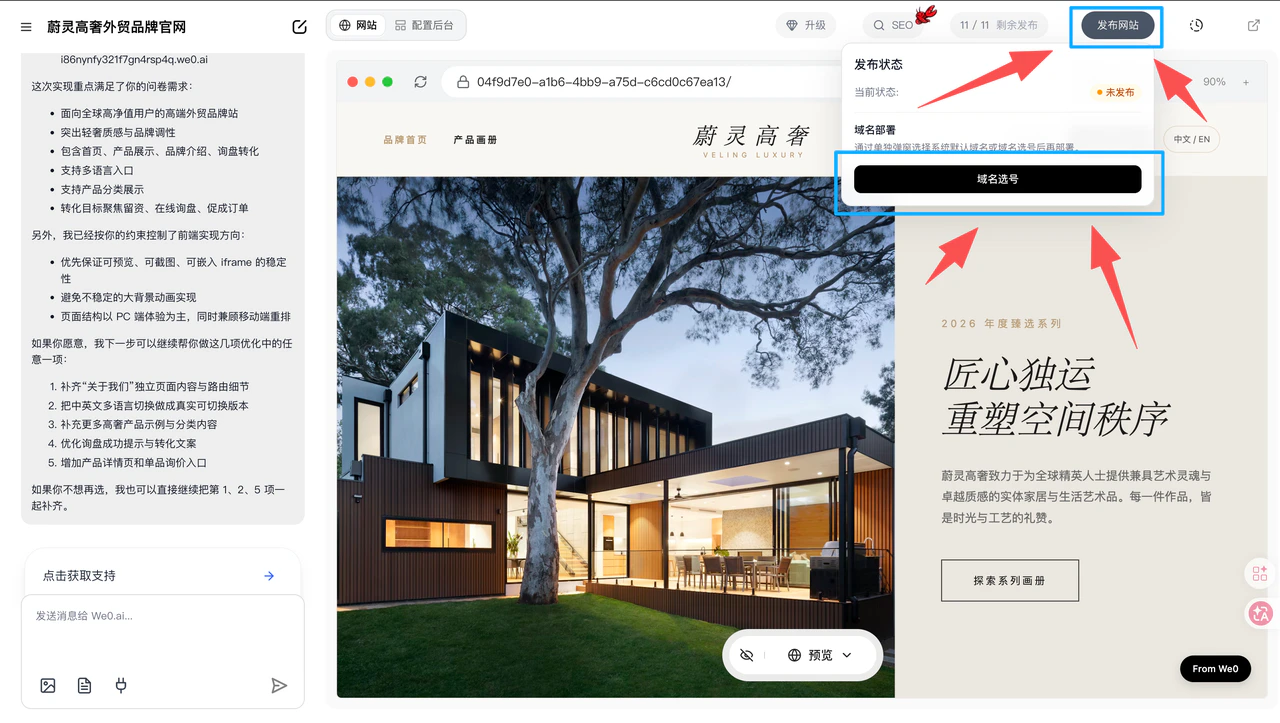 ***
### **1. Domain Options**
#### **Default System Domain**
* Free
* No domain registration needed
* Ready to publish immediately
#### **Domain Selection** (1380 plan only)
* Includes `custom domain selection`
* Ideal for users who want a domain closer to their brand name
#### **Custom Domain**
* Check pricing first
* Contact customer service to purchase
* Use for official binding and publishing after purchase
***
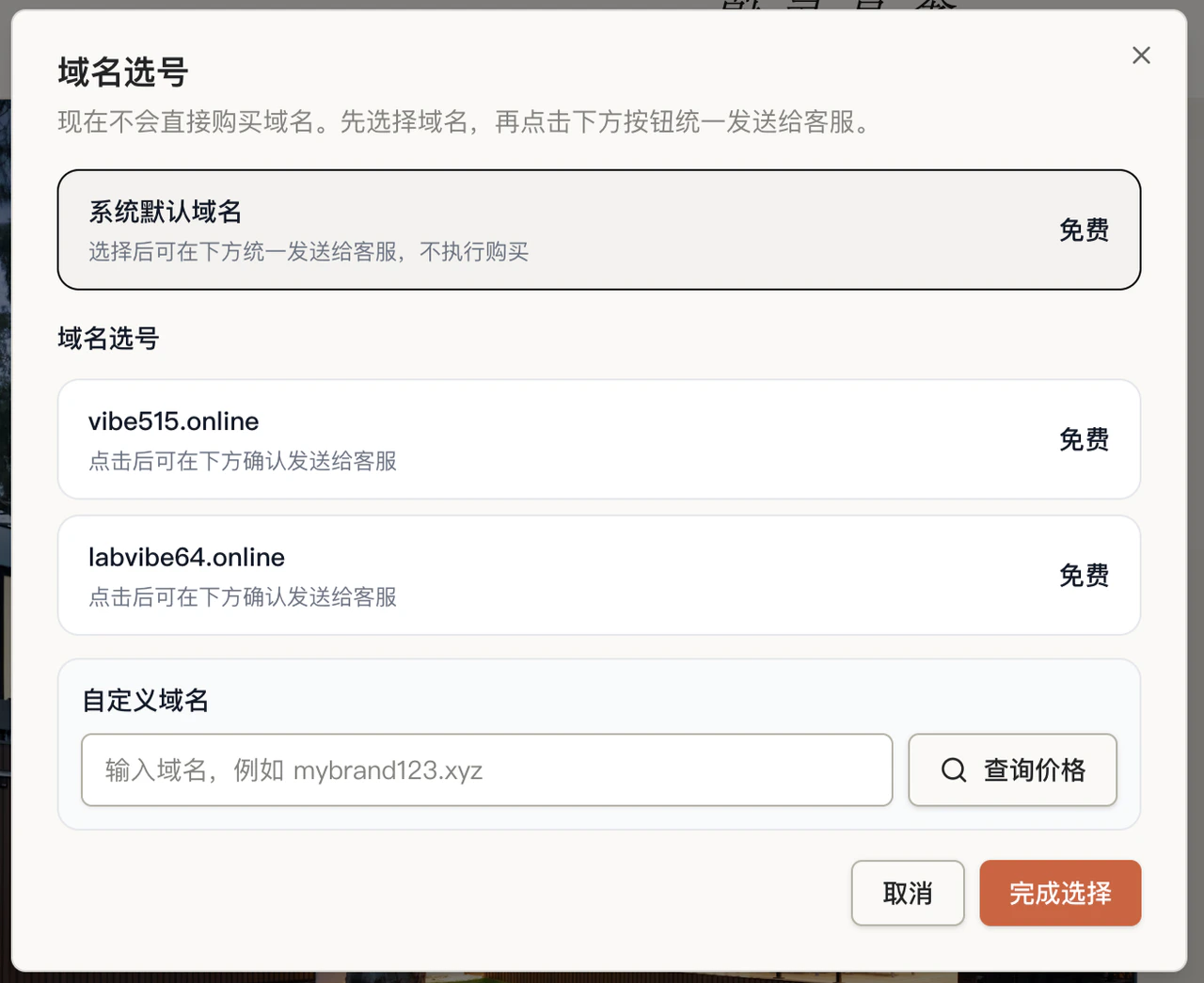
### **1. Domain Options**
#### **Default System Domain**
* Free
* No domain registration needed
* Ready to publish immediately
#### **Domain Selection** (1380 plan only)
* Includes `custom domain selection`
* Ideal for users who want a domain closer to their brand name
#### **Custom Domain**
* Check pricing first
* Contact customer service to purchase
* Use for official binding and publishing after purchase
 ***
### **2. Pre-Publish Checklist**
Before publishing, confirm:
* Page content is complete
* Mobile display is working properly
* Forms, buttons, and contact info are functional
* CMS backend basic configuration is done
Clicking "Publish Website" will consume one publish credit. After publishing, changes made in the preview page won't sync to the live version automatically — you'll need to click publish again to sync. (CMS backend changes are not affected.)
***
### **3. Publishing Process**
After selecting your domain, simply click "Publish Website."
* No need to purchase or configure your own server
* No need to deploy the project yourself (AI handles deployment automatically)
* Go live directly
***
### **4. After Publishing**
Once published, your website is immediately accessible via the corresponding domain.
Deployment URL: This is your website link. (You can access your site through this link — append `/cms` to the URL to access the management backend.)
***
### **2. Pre-Publish Checklist**
Before publishing, confirm:
* Page content is complete
* Mobile display is working properly
* Forms, buttons, and contact info are functional
* CMS backend basic configuration is done
Clicking "Publish Website" will consume one publish credit. After publishing, changes made in the preview page won't sync to the live version automatically — you'll need to click publish again to sync. (CMS backend changes are not affected.)
***
### **3. Publishing Process**
After selecting your domain, simply click "Publish Website."
* No need to purchase or configure your own server
* No need to deploy the project yourself (AI handles deployment automatically)
* Go live directly
***
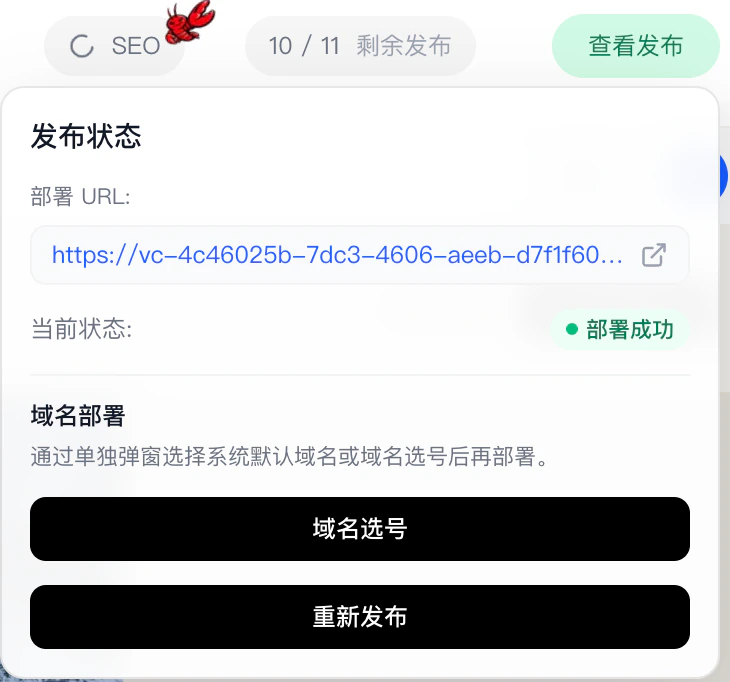
### **4. After Publishing**
Once published, your website is immediately accessible via the corresponding domain.
Deployment URL: This is your website link. (You can access your site through this link — append `/cms` to the URL to access the management backend.)
 ***
***