> ## Documentation Index
> Fetch the complete documentation index at: https://we0-f8eb3f1a.mintlify.site/llms.txt
> Use this file to discover all available pages before exploring further.
# 域名与发布
> 选择域名并一键发布网站,无需服务器配置即可完成上线。
[We0.ai](http://We0.ai) 的域名与发布流程很简单,核心就是:`选域名 -> 点击发布 -> 直接使用`
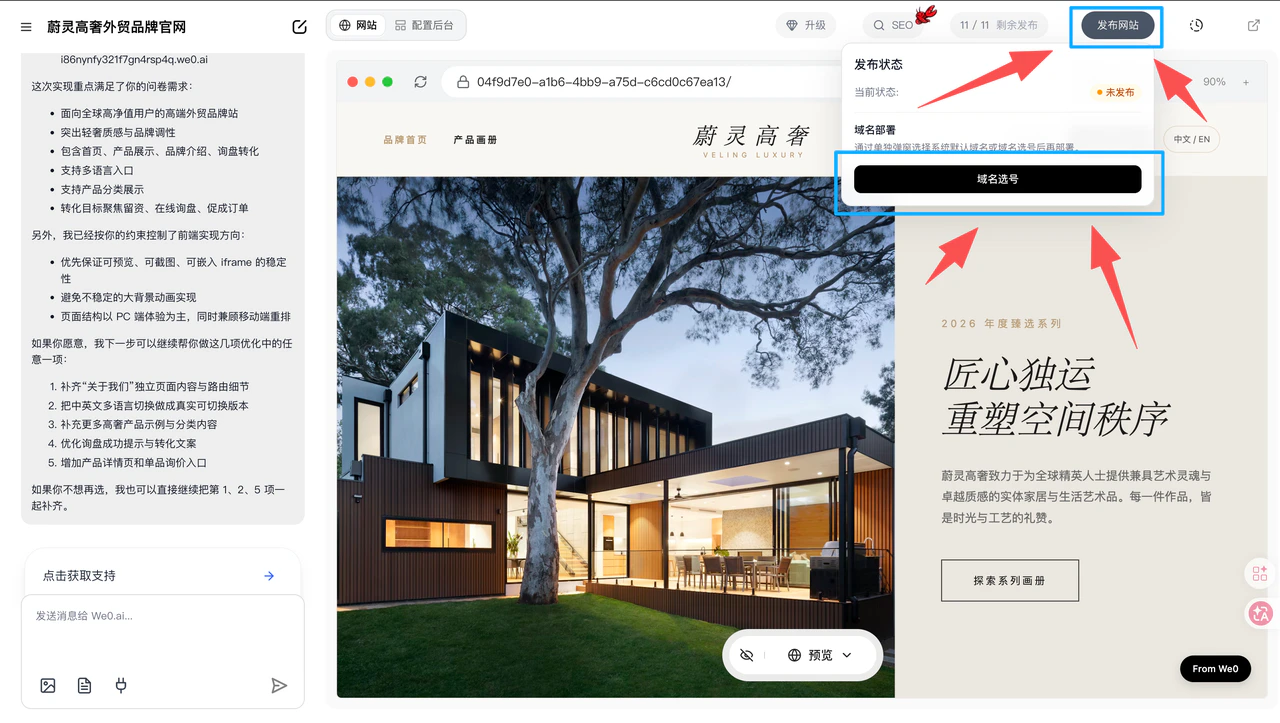 ***
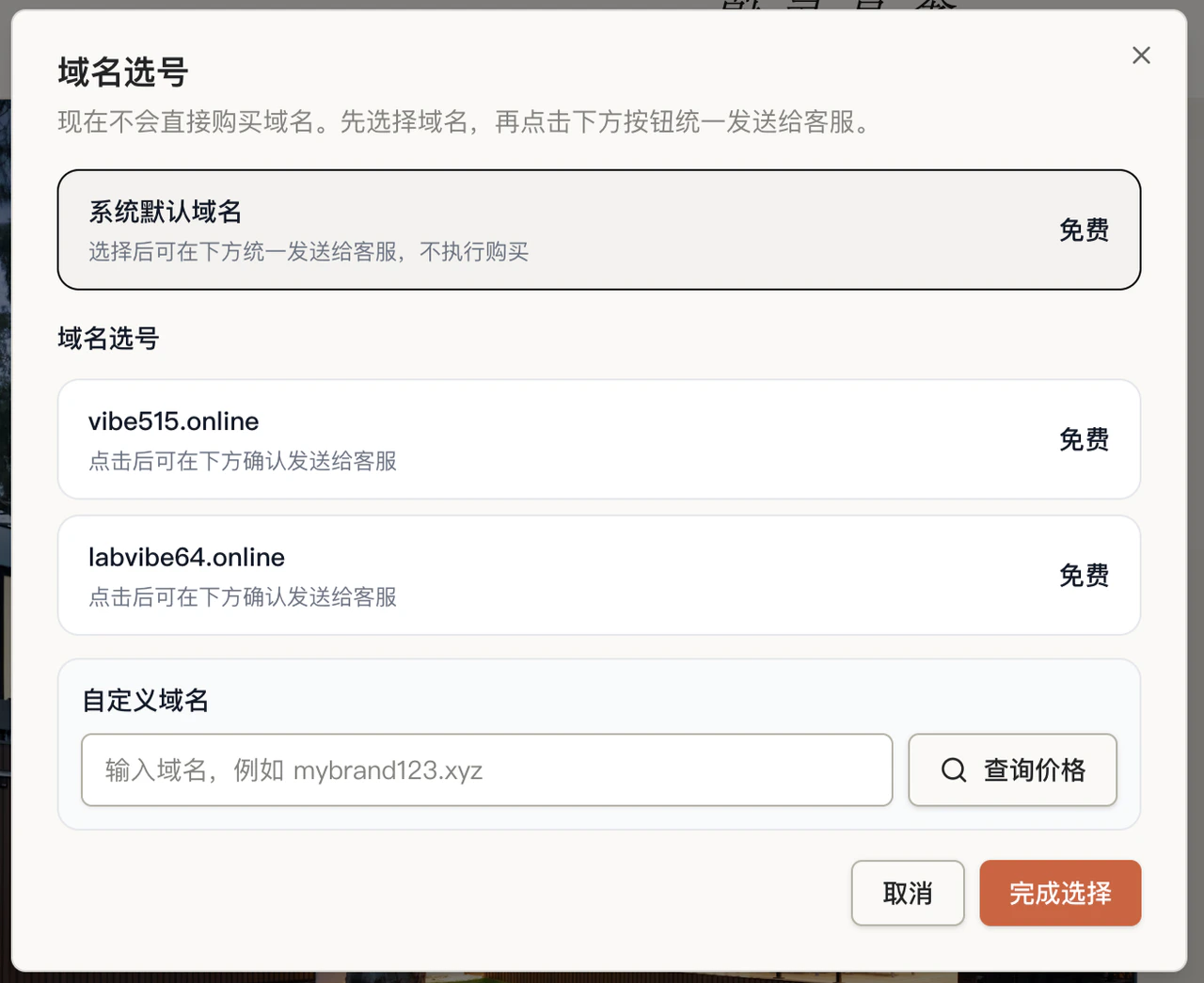
### **1. 域名选择方式**
#### **系统默认域名**
* 免费
* 无需注册域名
* 可直接用于发布
#### **域名选号**(仅限1380套餐)
* 赠送 `域名自选`
* 适合希望域名更贴近品牌名称的用户
#### **自定义域名**
* 先查询价格
* 再联系客服购买
* 购买后用于正式绑定和发布
***
### **1. 域名选择方式**
#### **系统默认域名**
* 免费
* 无需注册域名
* 可直接用于发布
#### **域名选号**(仅限1380套餐)
* 赠送 `域名自选`
* 适合希望域名更贴近品牌名称的用户
#### **自定义域名**
* 先查询价格
* 再联系客服购买
* 购买后用于正式绑定和发布
 ***
### **2. 发布前检查**
发布前建议确认:
* 页面内容已完成
* 手机端展示正常
* 表单、按钮、联系方式可用
* CMS 后台已完成基础配置
点击发布网站将会消耗一次发布次数,发布后在预览页面修改内容正式版不会同步修改,需要再次点击发布网站即可同步网站内容(cms后台修改添加不受影响)
***
### **3. 发布方式**
域名选好后,直接点击发布网站即可。
* 无需自己购买和配置服务器
* 无需自己部署项目(AI自动部署)
* 可直接完成上线
***
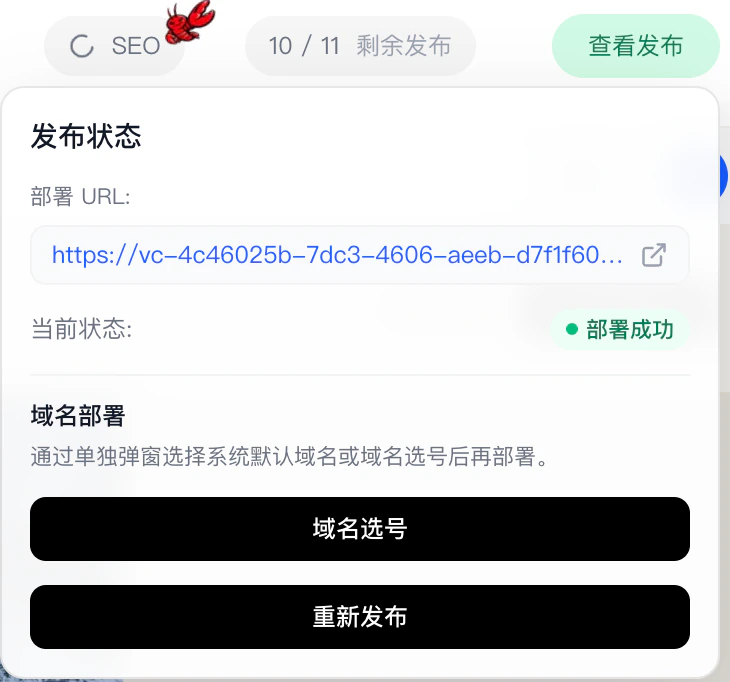
### **4. 发布后**
发布完成后,网站可直接通过对应域名访问和使用。
部署url:就是您的网站链接(可以通过这里进入您的网站,链接后面加上`/cms`就是管理后台)
***
### **2. 发布前检查**
发布前建议确认:
* 页面内容已完成
* 手机端展示正常
* 表单、按钮、联系方式可用
* CMS 后台已完成基础配置
点击发布网站将会消耗一次发布次数,发布后在预览页面修改内容正式版不会同步修改,需要再次点击发布网站即可同步网站内容(cms后台修改添加不受影响)
***
### **3. 发布方式**
域名选好后,直接点击发布网站即可。
* 无需自己购买和配置服务器
* 无需自己部署项目(AI自动部署)
* 可直接完成上线
***
### **4. 发布后**
发布完成后,网站可直接通过对应域名访问和使用。
部署url:就是您的网站链接(可以通过这里进入您的网站,链接后面加上`/cms`就是管理后台)
 ***
***